Dime Dime Baby AI Video: Make the Viral Dance From One Photo
Make your own Dime Dime Baby AI video from one photo. Watch a real example, learn how the viral dance works, and check credits and pricing.
The walk-in. The bite. That look at the camera.
Put yourself in the Dime Dime Baby scene without filming a dance or hunting down a template link.
- 1 person photo
- 9s · 9:16 MP4
- 720p · 60 credits
You can make a Dime Dime Baby AI video from one clear person photo on TrendClipGen. The current template produces a 9-second vertical MP4, with the example's original soundtrack. You do not need to record yourself dancing or write a prompt. A 720p generation uses 60 credits; credit packs start at US$9.90, paid once.
If you just want one clip for the group chat, start by watching the example above. The entrance, the pastry bite and the look into the lens matter more than the effect's name. Pick the scene you actually want before spending credits.
What Is the Dime Dime Baby Trend?
Dime Dime Baby is the party-dance meme with the walk-in, the bread bite and the deadpan look into the camera. You may also know it as the BbY WOW guy or concha dance. A concha is Mexican sweet bread with a shell-patterned sugar topping. The snack is part of the joke: the dancer gives the camera his full attention while casually chewing.
The party is often described in retellings as a quinceañera, a celebration of a girl's fifteenth birthday. That explains references to “the guy at the quince.” The public posts we checked are tagged Múzquiz, Coahuila, Mexico; their captions do not independently establish the exact celebration or filming date.
Who Is the Guy, and Where Did the Clip Come From?
The July 24, 2025 post from @eve.el.cholo identifies the dancer as Eve Ramírez and describes the footage as the original video that made him famous. There is also an earlier public copy from @enriquecruzmart, dated June 27, 2025. July 24 is therefore a verified post date, not a claim about the first upload or who filmed it.
The footage predates the later BbY WOW soundtrack and AI versions. For example, an October 17, 2026 post from @elmariobrox is captioned Dime Dime Baby and carries an AI label. The original party clip, a music edit and an AI recreation are different stages of the meme.
Dime Dime Baby and BbY WOW are overlapping names around the trend. On TrendClipGen, we offer two versions: Dime Dime Baby AI recreates this 9-second pastry-bite sequence; Bby Wow AI is a separate 15-second banquet dance. Preview the movement rather than choosing by the name alone.
Why Does the Dance Make Such a Good Meme?
Our read is that the humor comes from the contrast: a lively dance floor, an entirely unhurried snack and a look into the lens that feels far too serious for the situation. You can understand it without knowing the song or speaking Spanish.
The sequence also has four easy-to-recognize beats:
- The entrance: the dancer approaches as though he has somewhere important to be.
- The bite: the bread interrupts that confident arrival.
- The stare: he keeps eye contact while chewing. This is the payoff.
- The exit: he turns back to the party and leaves the camera with the joke.
That compact setup makes it easy to recognize a remake. Putting yourself in the scene changes the person while keeping the joke familiar. A successful AI version needs more than a matching face: the bite, expression and timing have to work together. This is an explanation of the format's appeal, not a measured claim about what caused its reach.
From One Photo to a Viral Dance Video
A matching input and completed generation, checked against our existing task record. Your result will vary with your photo.
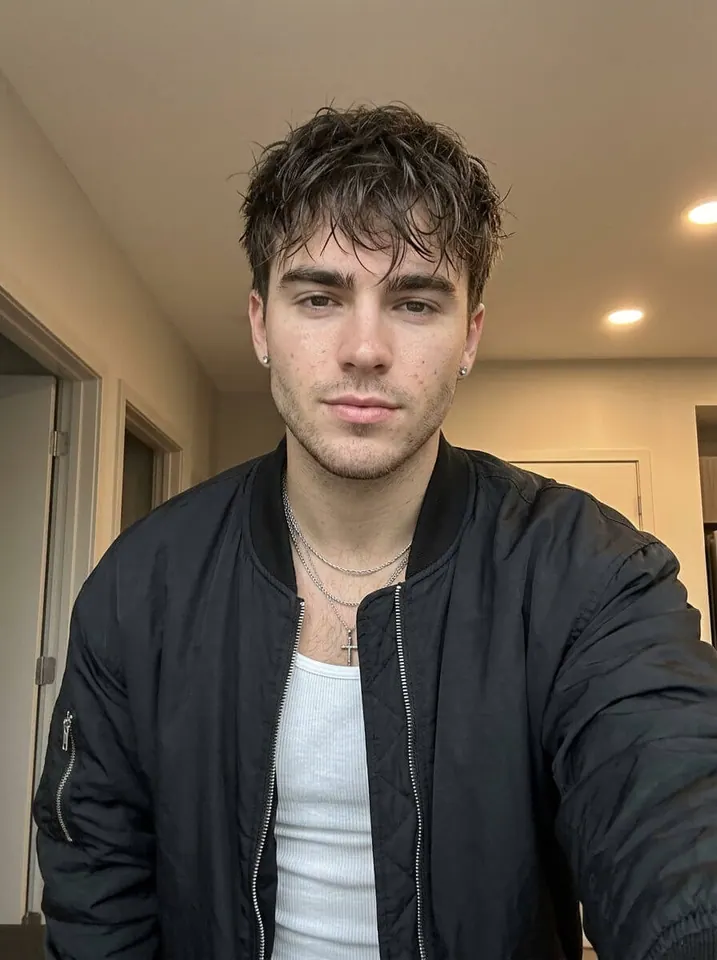
Just upload a clear photo of yourself. The AI creates the party scene and dance for you.
What We Observed in This Actual Generation
We reviewed this existing sample on October 23, 2026, rather than submitting a new paid test. The public example matches the completed output in our October 22 task record.
| Recorded item | This sample |
|---|---|
| Input | One indoor selfie; black jacket and white top |
| Selected quality | 720p, vertical 9:16 |
| Downloaded output | 9 seconds; 720 × 1278 pixels; MP4 with audio |
| Credits consumed | 60 |
| Submission to the recorded success update | 11 minutes 31 seconds |
The approach, bite and turn are present, and the black jacket and white top remain recognizable. The close-up has a softer, slightly smiling expression than the original's deadpan stare; the exit includes an arm lift. It captures the sequence without reproducing every performance detail.
The 11-minute-31-second interval is one recorded job, not an average or a promised delivery time. It includes the queue, status updates and final processing, rather than measuring model rendering alone. Check the bite and close-up in the playable example before deciding whether this style is right for you.
How to make your Dime Dime Baby AI video
1. Preview the Dance
Open the Dime Dime Baby AI generator in your browser and play the sample. This is a preset scene, so there is no CapCut project to find and no dance prompt to copy. You can use it on your phone or computer.
2. Upload one photo of one person
Use a clear photo of yourself, or someone who has agreed to the edit. A straightforward selfie with a visible face and upper body is a sensible starting point, as the example shows. JPG, PNG and WebP files up to 10 MB are supported. Skip group shots: this template has one person slot.
3. Choose Your Video Quality
Choose 480p for a lower-credit attempt, 720p for the recommended middle option, or 1080p for more output pixels. Check the credit total shown next to Generate. Watching the preview or choosing a file does not submit a generation.
4. Generate and Watch Your Video
Sign in, confirm your choice and submit. Follow the job on the effect page or in My Videos. When it is ready, watch the face through the bite, the fingers around the pastry and the turn back toward the crowd. Then download the MP4.
Choose my photo and make the video →Is Dime Dime Baby AI free? What does one video cost?
Generating on TrendClipGen uses credits. Signing up or watching examples is not a free completed video. If you already have enough credits, you can use that balance; otherwise, buy a one-time pack. There is no monthly subscription for these packs.
Choose by credits per video, then check how many attempts your balance covers. A new attempt costs credits even if you use the same photo.
For this 9-second template:
| Output | Credits per generation | A practical choice for |
|---|---|---|
| 480p · 9s | 30 | Trying a photo with fewer credits |
| 720p · 9s | 60 | The recommended balance |
| 1080p · 9s | 150 | A higher-resolution output file |
Starting from zero, the US$9.90 pack adds 100 credits. One 720p Dime Dime Baby generation uses 60 and leaves 40. Alternatively, that pack covers 3 separate 480p attempts, leaving 10 credits. Those are alternative ways to use the same balance.
The pack price is the upfront purchase, not a claim that you can buy exactly 60 credits separately. Purchased credits do not expire and can be used on other effects. See current packs and the effect's live quote before paying. Prices and credit settings checked October 23, 2026.
Will it look like me—and do I need a full-body photo?
The aim is to keep your face, hairstyle and outfit recognizable as the character moves. It is still an AI generation: the bite briefly covers the mouth, and turning away can make a face or outfit drift. More pixels cannot fix a face the model never saw clearly.
Choose a photo where:
- Your face is easy to read. Even light, a reasonably straight-on angle and no heavy sunglasses or hands across the face help.
- Your upper body and outfit are visible. Include the jacket or shirt you want the result to follow. You do not need to copy the sample's black jacket.
- Only one person is prominent. Crop away other people before uploading.
- The original is sharp. A screenshot of a tiny profile picture is a weaker starting point than the actual photo.
A full-body photo is not required for this template; the paired example uses a selfie. A wider shot provides more outfit information, but a large, clear face is more useful than a distant figure with invisible features.
Can the AI follow the dance instead of inventing random moves?
This effect uses a preset motion reference and scene direction, so you do not have to build that setup yourself. It targets the approach, bite, stare and exit. As our example shows, expressions and gestures can still differ; a frame-for-frame copy is not guaranteed.
What Song Is Dime Dime Baby? Is It in the Video?
The song associated with the trend is “BbY WOW” by KAROL G, Judeline and rusowsky, as listed on Apple Music. The “dime, dime, baby” hook gives the meme its other name; “dime” means “tell me” in Spanish. The track listing is from August 2026, after the 2025 party footage. The later @elmariobrox post also links this track in its sound metadata.
Our template uses the soundtrack supplied with this effect's reference clip. Play our sample with sound to hear that version. We do not promise that its cut, speed or mix matches every TikTok repost of BbY WOW. The upload photo supplies appearance, not a clone of that person's voice.
If you want a particular platform sound, select an available, permitted sound when posting and lower the video's original volume so the two tracks do not compete. Music availability depends on the platform, region and account. A generated download does not itself grant music rights. For branded posts, TikTok's commercial-music guidance explains the separate requirements.
Use the platform's AI disclosure controls when sharing. TikTok requires labels for realistic AI-generated video, including realistic people appearing to do something they did not actually do. A caption like “My AI party entrance” makes the joke clear without pretending you filmed it.
What Happens to My Uploaded Photo?
Your photo is used to make the requested video, including necessary processing and transfer to the generation services involved. Submitting a photo does not give us permission to publish it or your result in marketing. Public examples need separate permission.
Our Privacy Policy does not promise a fixed deletion period for this effect. Inputs, outputs and task records are kept as needed for delivery, history access, troubleshooting and security review. Third-party services have their own retention and training policies; this is not a blanket promise that no provider ever retains data.
To request deletion, email support@trendclipgen.com from your registered address and identify the photo, output or task. We verify the request and delete or anonymize eligible data, passing requests to providers where needed. Required legal records and backup rotation can affect timing. Use photos you have permission to upload, and download results you want to keep.
What If My Video Fails or Looks Wrong?
Still processing? Check the existing job before pressing Generate again. Render time varies with the queue and processing; there is no fixed completion-time guarantee. A new submission creates another job.
Marked failed? The system returns the consumed credits for a failed generation. If the message says a video was generated but final processing failed, keep the job ID and contact support rather than resubmitting the same photo. That existing output may be recoverable.
Finished, but the face or hands look off? Improve the source photo before trying again. A completed result you dislike is different from a failed job. Another attempt, even at a different resolution, is a new paid generation—not a free upgrade. Going from a 480p attempt to a new 720p attempt uses 90 credits in total.
Quick questions before you make one
Is this a filter or a generated video?
It generates a new video from your photo and the preset scene. You are not recording a live camera filter. Review the sample's movement before choosing it.
Do I need CapCut, a prompt or a dance recording?
No. The browser workflow already has the scene and motion setup. Bring one person photo and choose the output quality.
Can I use a friend, a pet or two people?
A friend's photo is fine with their permission. This particular template is built for one person, not a two-person or pet upload. Check the input description when choosing a different effect.
Is the download vertical? Does it have a watermark?
The current output is a 9-second, 9:16 MP4. TrendClipGen does not add a site watermark to the generated video. The sample lets you inspect the scene and framing before you pay.
Sources & How We Verified This Guide
Reviewed October 23, 2026. We checked the public posts' captions, timestamps, location tags and sound metadata, the music listing, our template and pricing catalog, and our Privacy Policy.
- Footage and identity: the June 27, 2025 copy and @eve.el.cholo's July 24 post. These establish public post dates, not the filming date or the first-ever upload. The quinceañera description is common in retellings; the checked captions do not confirm that event detail.
- Later AI version and music: the October 17, 2026 AI-labeled post and Apple Music's BbY WOW listing.
- Questions worth answering: an X reply about motion references and a Reddit question about affordable dance tools and choreography. These are related AI-dance questions, not reviews of our effect. Exact-name Reddit results were sparse; this is editorial research, not a representative survey or a popularity ranking.
- Our example: we matched the public sample to an existing successful generation and reviewed its file and task record. The table reports that single job's settings, cost and elapsed interval. We did not run a fresh paid generation for this revision or benchmark typical waiting times.
Ready for your entrance?
Choose a photo where your face is clear, play the example once more and confirm the credit quote. The scene is already set up.
Make my Dime Dime Baby AI video →