
How to Make a Gangsta's Paradise AI Video With a Friend
Put yourself and a friend in the viral Gangsta's Paradise AI video. Take the mic, join the choir-backed rap trend, and create yours from photos.
You know that friend who takes karaoke way too seriously?
Give them a microphone. Give them a dramatic camera angle. Now put an entire choir behind them.
Congratulations. You've just created their dream performance.
That's the idea behind the Gangsta's Paradise AI trend, where two people perform a ridiculously dramatic version of Coolio's classic hit while a massive choir provides the backing vocals.
The funniest part is how seriously everyone takes it.
And now you can put yourself and a friend in the video.
Want to find out who deserves the microphone? Try the Gangsta's Paradise AI effect on TrendClipGen.
The version shown here uses a daylight ranch, a row of mounted riders and snowy mountains. It follows the two-person rap-and-chorus format, rather than the sci-fi choir setting.
Two friends. Your turn at the microphones.
Photo 1 leads the opening rap. Photo 2 takes the closing foreground chorus in the ranch scene.
- 2 photos
- 15s · 4:3 MP4
- 720p · 100 credits
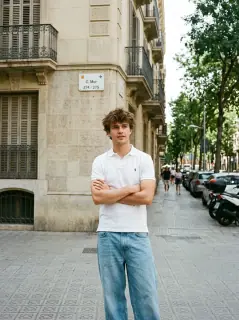
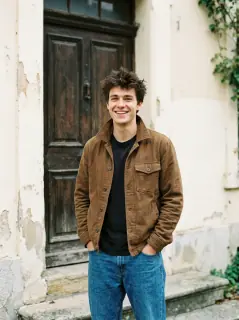
Generated example made from two supplied portraits: a curly-haired man in a white short-sleeved Polo shirt and blue jeans opens the ranch rap, gestures with a microphone and raises his arm as the camera moves closer. A curly-haired man in a brown jacket and black shirt then sings in the foreground, with the white-Polo partner, mounted riders, barns and snowy mountains behind him. The 15-second clip includes vocals and music.
Generated example made from the two supplied portraits. The white-Polo lead opens the rap, and the brown-jacket lead takes the closing foreground vocal before the mounted riders and snowy mountains.A Rap Performance Nobody Saw Coming
The song itself needs little introduction.
Released in 1995, "Gangsta's Paradise" by Coolio featuring L.V. became one of the defining hip-hop hits of the decade. Tommy Boy's label history records the single among its 1995 releases. Its dramatic chorus and unforgettable beat made it instantly recognizable.
The song was also featured in the film Dangerous Minds.
Fast-forward to November 2026, and the internet found a completely unexpected use for it.
AI creators started making parody music videos featuring unlikely characters performing the song with the intensity of a stadium concert.
According to RapVideo.ai's trend roundup, an early version shared by El G (@EkoeGG505) on November 5, 2026 placed two performers in a huge sci-fi hangar surrounded by rows of armored figures singing like a choir. That is an attributed example, rather than proof of the first-ever version.
Other versions followed, including scenes set on a ranch or inside a grand cathedral.
The basic idea stays the same.
One character delivers the rap verse straight into the camera. A second character steps forward for the chorus. Behind them, the crowd joins in like this is the most important performance in music history.
It's the contrast that makes the video work.
The song is serious. The performances are dramatic. But the characters are often people you'd never expect to see holding a microphone.
And that's exactly why making one with someone you know is so funny.
There's Only One Question: Who Gets the Chorus?
Imagine your best friend delivering Coolio's verse with a completely straight face.
Then you walk into the shot, raise your microphone, and take over the chorus.
Or maybe you should switch roles.
The popular two-person format has a simple setup:
The rapper: Takes the opening verse, gestures toward the camera, and delivers the main performance.
The chorus singer: Appears later, steps up to the microphone, and takes the big closing moment.
The surrounding scene and supporting crowd are generated as part of the video. In this TrendClipGen preset, that crowd is the ranch's mounted riders; they are not additional photo slots.
For this version, use two separate person photos. Photo 1 controls the opening rapper, including the side close-up and the partner behind at the end. Photo 2 controls the closing foreground singer. Upload order assigns these roles; the people do not swap when the camera moves.
And yes, giving the dramatic final chorus to your quietest friend is probably the funniest casting decision you can make.
Your own version starts with two ordinary portraits of you and your friend. The intended result is a new ranch performance with your appearances in the two lead roles.
The preview block above pairs the two supplied original portraits with their generated ranch video. The white-Polo portrait supplies the opening rapper, and the brown-jacket portrait supplies the closing foreground singer.
Let's Get You Behind the Microphone
You could try building a whole rap performance with custom AI prompts and reference videos.
But if you're only here to make the meme, a ready-made effect is a much easier starting point.
Here's how to use the Gangsta's Paradise AI effect on TrendClipGen.
Find the Gangsta's Paradise effect.
Open the effect and watch the preview before doing anything else.
Check which version you're getting. This preset uses the ranch scene: white buildings, mounted riders and snowy mountains. It does not offer a hangar-or-cathedral background switch.
Choose your performers.
For the duet version, prepare one clear photo of each person.
Check the upload labels to see which photo controls the rapper and which controls the chorus singer.
You don't need to hold a microphone or record yourself singing.
Generate your performance.
This preset makes a 15-second, 4:3 MP4. Choose 480p, 720p or 1080p, review the displayed credit cost, and then click Generate. The audio follows this template's generated-vocal setup; there is no custom voice or song selector in this flow.
Check progress in My Videos. Once the video is ready, watch both performances.
Does the first person still look recognizable? Does the second appear at the right moment? Does the final chorus land the way you expected?
If you're happy with it, download the video and send it straight to your co-star.
Try Gangsta's Paradise AI on TrendClipGen →
Your Friend's Face Is the Punchline. Keep It Recognizable.
Unlike a dance effect that keeps the camera far away, this trend features dramatic close-ups.
The camera moves toward the performer, sometimes while they're pointing directly at the lens or leaning into the microphone.
That means facial consistency matters.
A few tips before uploading:
- Use a sharp, front-facing photo. The AI needs a clear reference for facial features and mouth movements.
- Keep the mouth visible. Avoid photos with hands, scarves, or other objects covering the face.
- Use separate photos for each person. Don't make the AI guess who should be rapping from a group selfie.
- Choose distinct appearances. Different hairstyles or outfits may help the AI keep the two performers separate.
Waist-up photos are a good starting point because they show both your face and clothing.
You don't need matching outfits. In fact, seeing your friend perform a dramatic rap verse in their everyday hoodie might make the whole thing even better.
Just remember that AI can occasionally change facial details or clothing between camera cuts.
Does It Actually Play Gangsta's Paradise?
This is worth checking before you spend credits.
Different AI versions handle audio differently.
This TrendClipGen version generates the two lead voices together with the picture, keeps those generated vocals, and mixes them with the ranch reference's separately prepared accompaniment and extracted background choir. The two leads keep their generated voices. It does not clone the people in your photos, and you do not need to provide a voice sample.
Some recreations use the recognizable song, while others generate an original hip-hop beat with rap-style vocals and a backing choir.
That means your finished video might have the right atmosphere without containing Coolio's actual recording.
Lip-sync isn't guaranteed either. Even if the mouth moves convincingly, it may not match every word of the original lyrics.
Check the effect's preview and audio information before generating.
If you choose to add or change a music track when posting, look for a version you are authorized to use in the destination platform's music library.
Keep in mind that music available for personal social posts isn't automatically cleared for commercial use. TikTok's music guidance explains its commercial-use rules; check the terms for the platform and post you plan to use.
Is Gangsta's Paradise AI Free?
You can explore available video effects on TrendClipGen, but generating AI videos requires credits.
TrendClipGen offers one-time credit packs and membership options.
Its regular USD Starter Pack reference price is $9.90 for 100 credits, and purchased one-time credits don't expire.
The current 15-second Gangsta's Paradise effect costs 50 credits at 480p, 100 at 720p, or 250 at 1080p. Eligible offers and regional prices appear on the pricing page.
Check the credit total before starting. A 100-credit pack isn't guaranteed to cover every version.
See the TrendClipGen Pricing page for the current options.
What if generation fails?
If a task fails because of a confirmed technical issue, its deducted credits are automatically returned.
A completed video that doesn't match your expectations is different. Creating another version may require additional credits.
A Few Things You'll Want to Know
Can I make a Gangsta's Paradise AI video from one photo?
This TrendClipGen version requires two separate person photos: Photo 1 for the opening rapper and Photo 2 for the closing singer. A single group photo does not fill both roles. Other generators may offer solo versions.
Can I change the background to a cathedral or ranch?
Different versions of the trend use different settings, from sci-fi hangars to cathedrals and ranches. This preset is fixed to the ranch scene; the background of your uploaded portrait does not choose a new location.
Do I need to know how to rap?
No. Photo-based AI video effects generate the performance without requiring you to record your voice or perform the song yourself.
Can I use my dog or cat?
This Gangsta's Paradise preset requires two person photos. Some other effects support animals, but that does not make this duet a pet template. Choose an explicitly pet-compatible effect for a dog or cat.
How long is a Gangsta's Paradise AI video?
This TrendClipGen preset generates 15 seconds in 4:3, with 480p, 720p and 1080p choices. Other versions of the trend may use different lengths and scenes; check the selected effect rather than assuming they share the same settings.
Is this an official Coolio music video effect?
No. These AI recreations are independent, fan-inspired parodies. They're not official productions endorsed by Coolio's estate, L.V., or their record labels.
If you're sharing a realistic AI performance, follow the platform's AI-content disclosure requirements and get permission before using someone else's photo.
Give Your Most Dramatic Friend the Mic
Every friend group has someone who thinks they could have been a rapper.
Someone who knows every lyric.
Someone who turns a casual karaoke night into a full concert.
This is their moment.
Pick two photos, decide who gets the verse, and see what happens when you put yourselves in front of a ranch full of spectators.
For your finished video, a few captions could work:
- "We booked the whole choir for this."
- "Nobody told us to take it this seriously."
- "The group chat signed a record deal."
- "Bro finally got his big break."
- "POV: Karaoke night got out of hand."
Make Our Gangsta's Paradise AI Video →
Two friends. Two microphones. A crowd that didn't ask to be here.