
How to Make a Give It All to Me AI Video From One Photo
Turn your photo into the viral Give It All to Me AI rap video. Recreate BigXthaPlug's hanging-mic performance and make your own version online.
A silver mic hangs from the ceiling. Orange showtime boards glow overhead. A crowd is packed into a movie theater lobby, backing the person at the mic.
Now picture that person as your friend who treats every car ride like a concert.
That's the appeal of Give It All to Me AI: an ordinary portrait becomes the lead in an instantly recognizable rap performance. On TrendClipGen, you upload one person photo to make a 12-second, vertical 9:16 video. You don't need to film yourself, record a verse or write a motion prompt.
One photo. Your turn at the hanging mic.
Your photo supplies the foreground performer. The hanging microphone, cinema setting and crowd come from the preset.
- 1 person photo
- 12s · 9:16 MP4
- 480p · 40 credits
Why Is Everyone Rapping in a Movie Theater?
The setup comes from BigXthaPlug's “GIVE IT ALL” performance on From The Block, published by 4 Shooters Only. The hanging silver microphone, glowing cinema signs and crowd give the clip its unmistakable look.
The artist's official Bandcamp page lists the song as “GIVE IT ALL,” from BETTER OVER TIME. “Give It All to Me” is the hook people recognize, which explains the longer name used for this effect.
The Give It All AI trend puts a new person at that microphone. The joke is the unexpected headliner: you, your quiet coworker or a friend who has agreed to join in.
This version replaces only the foreground lead. The crowd keeps separate identities. One upload doesn't turn every spectator into the same person, and it doesn't let you cast the whole group.
A Good Photo Does More Than a Rapper Pose
You don't need a full-body shot, a microphone or a cinema background. A clear chest-up or waist-up portrait is a practical starting point.
Choose a photo with:
- One person, facing the camera. Avoid group shots, collages and another face peeking over a shoulder.
- A sharp, evenly lit face. Skip dark selfies, heavy beauty filters and sunglasses.
- An unobstructed mouth. Hands, phones and high collars can make the face harder to animate.
- The full hairstyle and visible outfit. Include the neckline, shoulders and upper-body clothing you want the performer to wear.
Your photo guides the face, hair, build, clothes and accessories. You don't need BigXthaPlug's cap or denim jacket. Keep your own look.
A tiny face crop gives the model little information about clothing or shoulders. A photo taken farther back, with those details clearly visible, is more useful than a close-up cropped at the chin.
How to Make Your Give It All AI Video
1. Open the effect and watch the preview
Go to the Give It All to Me AI effect. The preview shows the routine: the lead rocks to the beat, moves their arms across the torso, turns beside the mic and gestures toward the camera.
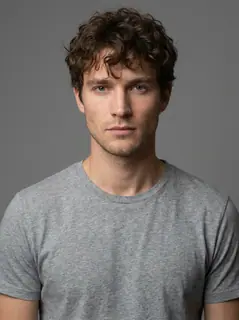
This preset uses a fixed 12-second section. The preview is a supplied generated example. It shows one result from the gray-T-shirt portrait, rather than a guarantee that every new photo will match equally closely.
2. Upload one clear person photo
Use a photo of yourself or someone who has agreed to appear. There is one upload slot, for the lead performer. You don't need to upload a video, depth map or voice recording.
3. Choose the quality, check the credits and generate
480p is selected by default. You can choose 720p or 1080p instead. Check the credit total beside the generate button before submitting.
Follow progress in My Videos. When it's ready, watch the full clip before downloading the MP4. Check the face in both front and side views, the hands near the lens, and whether the mouth moves naturally with the rap.
Try Give It All to Me AI →
Will It Use BigXthaPlug's Voice—or Mine?
Neither voice is cloned. The opening 3.5 seconds keep the reference music and its sung hook. At the rap entrance, this effect generates a new character voice along with the picture, then mixes those vocals with accompaniment prepared from the supplied performance clip. A photo cannot supply your real speaking voice, and no voice sample is required.
The template uses preset English rap lines. It has no custom-lyrics, language or song selector. If you want to write your own topic or short lyrics, try the separate AI Rap generator.
The goal is a recognizable performance with coordinated mouth movement, not a perfect copy of every syllable. Fast words, hands crossing the face and side-angle cuts can affect the result. The preset also contains explicit language, so listen before sharing it with a wider audience.
How Much Does Give It All to Me AI Cost?
Watching the public preview is free. Generating a new video uses credits. For this 12-second preset, the current costs are:
| Output quality | Credits per video |
|---|---|
| 480p · Default | 40 |
| 720p | 80 |
| 1080p | 200 |
For a lower-cost first try, start at 480p. If you like the completed video, Smart Upscale in My Videos can make a 1080p version for another 10 credits: 50 credits total, versus 200 for direct 1080p generation. Upscaling improves output resolution; it doesn't fix an unwanted expression or replace a distorted hand.
The regular USD Starter Pack is $9.90 for 100 credits. One-time credit packs don't expire or renew automatically. Memberships and any eligible offers are listed on the pricing page; check the current quote before purchasing.
If a technical generation failure is confirmed, the deducted generation credits return automatically. A queued task is still pending. A completed video that you choose to remake is a new generation and may use more credits. For payment-refund questions, see the refund policy.
A Few Questions Before You Take the Mic
Can I use a photo of my friend?
Yes, with their permission. Use a clear photo of that person alone. To give several friends a turn, make separate videos; this effect has one lead and one photo slot.
Can my dog or cat be the rapper?
This preset accepts a person photo, not a pet photo. Browse Photo to Video for an effect whose upload requirements match your subject.
Do I need CapCut, editing skills or a recording?
No. You can create and download this version in your browser. The preset supplies the performance; you supply the portrait.
Will it keep my exact face and outfit?
The photo guides both, including across the side-angle shots, but exact likeness isn't guaranteed. If details drift, try a clearer, evenly lit portrait that shows the full hairstyle, shoulders and outfit. Raising the resolution alone won't correct an identity mismatch.
How long does generation take?
The workbench shows an estimated 5–15 minutes, not a guaranteed deadline. Queue demand and processing can take longer. Check My Videos instead of submitting the same request again while it is still processing.
Where do I download it?
Open My Videos, find the completed task, preview it and download the 12-second, 9:16 MP4. No separate editing app is needed.
Is this an official BigXthaPlug or From The Block effect?
No. This is an independent AI recreation inspired by the performance, not an official collaboration or endorsement. Share it as an AI-made clip, and use photos and music you have permission to use.
Now Who's Getting the Mic?
Pick someone the group chat would never expect to headline a rap video. Start with a good portrait, check the credits and give them a turn.
Need a caption?
- “I came to watch a movie, not start a rap career.”
- “The group chat signed me to a record deal.”
- “Nobody told me I was the headliner.”
Make My Give It All to Me AI Video →
Want a different performance? Try Stormzy Shut Up AI for an outdoor freestyle, or Gangsta's Paradise AI for a two-person rap video.