
How to Make a Closer Dance AI Video With a Friend
Make your own Closer Dance AI video with a friend. Recreate the viral Ne-Yo dance battle using photos, with easy tips and no filming required.
Turn a parking garage into a dance floor
Pick a photo of yourself and one of a friend to recreate the face-off set to Ne-Yo’s “Closer.”
- 2 photos
- 15s · 9:16 MP4
- 720p · 100 credits
Two dancers in a brown sweatshirt and a striped sweater perform in a sunlit parking garage. The camera moves between them as they reach forward and raise their arms.
Original reference · 15-second excerpt · sound included. This demonstrates the routine, not a verified result generated from user photos.You know that one friend who can turn absolutely anything into a competition?
Imagine them stopping inches from your face and challenging you to the most ridiculous dance battle imaginable. All while Ne-Yo's “Closer” plays in the background.
That's the Closer Dance AI trend. And the best part isn't the choreography. It's seeing two people you actually know acting like they're in the world's most dramatic dance-off.
Your roommate. Your best friend. That coworker who takes everything way too seriously.
Whoever comes to mind, this is your chance to put them in the video.
The Closer Dance AI effect on TrendClipGen uses two separate person photos to create a 15-second, 9:16 parking-garage dance video with the reference clip's original soundtrack. You don't need to film yourselves or learn the routine.
The Funniest Dance Battle Nobody Asked For
If you've seen the Closer dance trend, you know the appeal: two people turn a mock confrontation into a full commitment to the bit. Dramatic poses. Exaggerated reactions. Then, suddenly, they're dancing together.
The joke is that neither person breaks character. They're treating a silly dance routine like it's the final battle in an action movie.
The trend is associated with Gnomeboys (@gnomeboys), a Melbourne creative group. Their FRND Magazine interview includes their dance to “Closer” and discusses how they build movement around music and making each other laugh.
Different edits show different parts of the routine. Our effect uses a 15-second parking-garage segment, with a hand reaching toward the camera, a face-off, a jump, leaning close-ups and paired dance moves. It doesn't recreate the complete longer entrance sequence or every version circulating online.
Watching a familiar face take that showdown seriously might be funnier than the original.
Who's Taking Which Part?
Before choosing photos, there's one decision worth making: who plays each dancer?
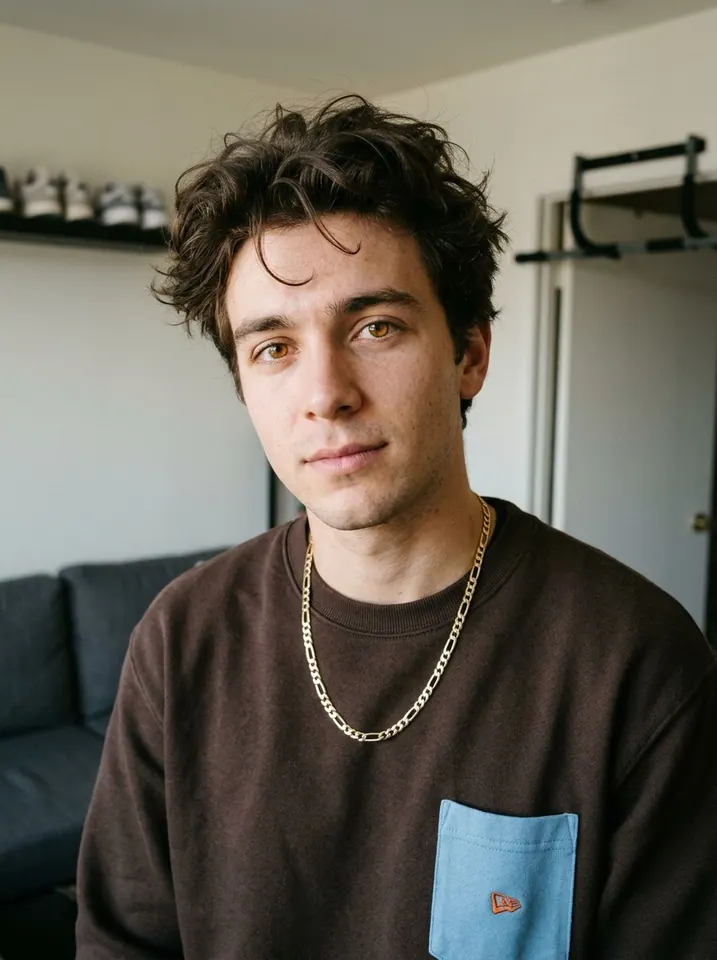
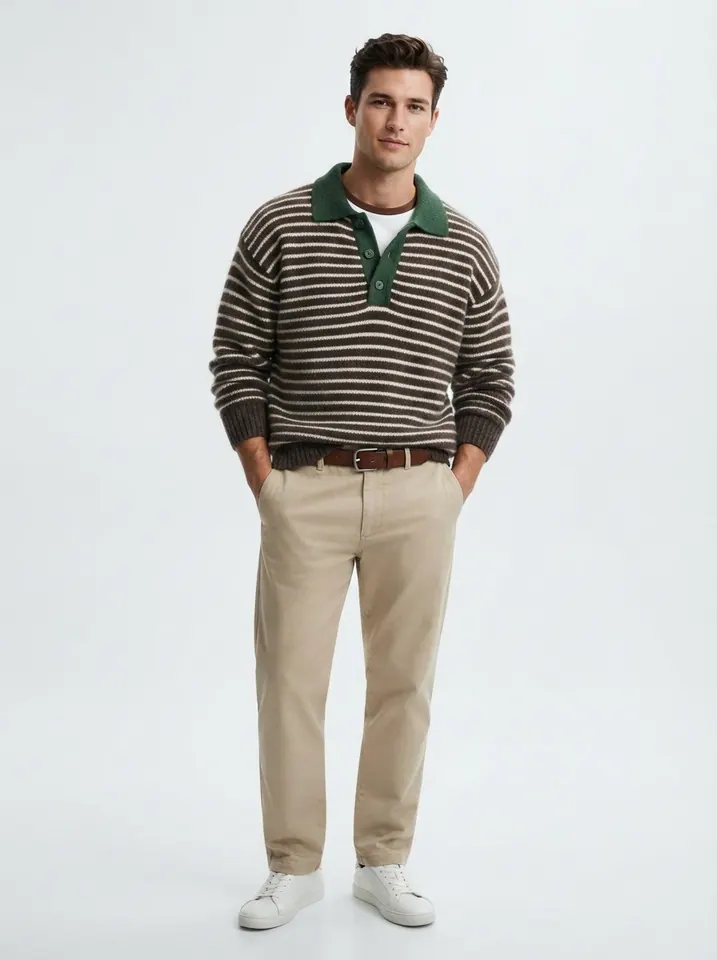
For this effect, Photo 1 controls Dancer A, including the jump, smiling close-up and final medium shot. Photo 2 controls Dancer B, including the opening reach toward the camera and leaning close-ups.
The dancers turn and change positions. A and B identify the people throughout the clip; they don't mean “always on the left” and “always on the right.”
My vote? Give the exaggerated camera reach to the friend who can never resist a dramatic entrance.
The preview above shows the supplied example video made with these two example photos. Photo 1 controls Dancer A; Photo 2 controls Dancer B. Upload one separate photo of each of your two stars to make your own version.
You Don't Need to Learn the Dance
The choreography involves quick movements, dramatic timing, and two people reacting to each other. Recreating it yourself would probably take more than a few attempts. With a ready-made effect, you can skip the rehearsal.
Start With the Closer Dance Effect
Open the Closer Dance AI effect and watch the example first. Make sure this parking-garage version is the one you want, rather than a different edit of the trend.
Pick Your Two Stars
Upload one clear photo of each person. Put Dancer A in Photo 1 and Dancer B in Photo 2. You don't need to pose together or record yourselves dancing.
A waist-up or full-body photo gives the AI more information about clothing. Choose pictures where both faces are sharp, uncovered and easy to recognize.
Generate Your Dance Battle
Choose 480p, 720p or 1080p, review the credit cost, then select Generate. Estimated processing time is 5–15 minutes. Check progress in My Videos, where you can preview and download the finished MP4.
Watch both close-ups and the paired dance. Do both people still look recognizable? Do their outfits stay distinct when they turn?
If the result makes you laugh, it's probably ready for the group chat.
Create Our Closer Dance Video →
Two People, One AI Video. What Could Go Wrong?
The dancers move close together, change positions, and reach toward the camera. That's when faces, hands and clothing can become inconsistent. A few simple choices can help:
- Use separate portraits. One crowded group selfie doesn't assign both roles.
- Choose recognizable faces. Good lighting and minimal filters give the AI a stronger reference. Avoid sunglasses or a phone covering the face.
- Show distinct outfits. Visible shoulders, arms and clothing help distinguish the two people during movement. A full-body photo is useful for the wide shots.
- Don't match the original wardrobe. Each uploaded photo guides that dancer's face, hair, body and visible clothes. Your everyday outfits can make the result more personal.
Don't expect a frame-perfect copy. AI motion can alter facial details, fingers, clothing and cut timing, even with the same photos. If something looks off, check your references before spending credits on another attempt.
Is the Closer Dance AI Free?
Watching the preview is free. Generating your own version uses credits. This 15-second effect costs 50 credits at 480p, 100 at 720p, or 250 at 1080p. Check the selected quality and displayed cost before submitting.
The regular USD Starter Pack is $9.90 for 100 credits. Eligible first-purchase offers and regional currency prices appear on Pricing & Credits. You can buy a one-time credit pack without a subscription; purchased pack credits don't expire. Membership options have their own billing and credit rules.
If generation fails because of a technical issue, the deducted credits are automatically returned. A successfully generated video that you choose to remake is a new paid task. See our Refund Policy for details.
Does the Video Include Ne-Yo's “Closer”?
The dance is associated with “Closer” by Ne-Yo, a 2008 release listed by Official Charts.
This effect adds the supplied reference clip's original soundtrack to the generated picture. Play the preview to hear the included excerpt. You don't need to record audio, and it doesn't reproduce your real voice. This preset doesn't offer a custom song selector or guarantee exact lip-sync.
Generating a clip doesn't itself grant rights to publish the recording. When sharing, use audio you have permission to use or an authorized track in your social app's music library. You can also credit @gnomeboys as the dance inspiration.
A Few Questions Before You Try It
Can I make a Closer Dance AI video from two photos?
Yes. This effect requires two separate person photos: Photo 1 for Dancer A, Photo 2 for Dancer B. A single group picture doesn't fill both slots.
Is this a couples dance?
Not really. Couples can recreate it, but this is a playful two-person showdown, not a romantic slow dance. Try it with friends, roommates, siblings or a partner.
Does the video show a real fight?
No. The confrontation is exaggerated dance choreography. The serious expressions are part of the comedy.
Will our faces still look like us?
That's the goal, but perfect consistency isn't guaranteed. Fast movement, changing angles and overlapping bodies can cause facial details to shift. Use sharp, well-lit individual photos with visible hair and clothing.
How long is a Closer Dance AI video?
This version is 15 seconds, in 9:16 vertical MP4 format. It focuses on the selected face-off and dance sequence, not the entire longer source video.
Can I use someone else's photo?
Only with their permission. Make sure both people agree to their likenesses being used. For photo processing and deletion requests, see the TrendClipGen Privacy Policy.
Every Friend Group Needs This Video
There are plenty of dance trends that make you wish you were a better dancer. This one just makes you think of the friend who always takes the joke one step further.
Pick your two photos. Choose your roles. Let the AI handle the choreography.
And when it's done, send it to the person who would absolutely take this dance battle too seriously.
Make Our Closer Dance AI Video →
Because some friendships deserve their own ridiculous dance-off.