
How to Make a La Tormenta de Arena AI Video From Photos
Make your own La Tormenta de Arena AI video from photos. Recreate the viral nightclub spotlight scene with someone special, no editing needed.
Catch each other’s eye across the dance floor
Cast one person at the upstairs railing and the other in the spotlight below to recreate the nightclub scene.
- 2 photos
- 10s · 9:16 MP4
- 720p · 70 credits
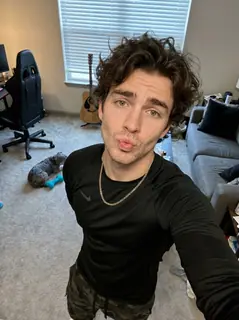
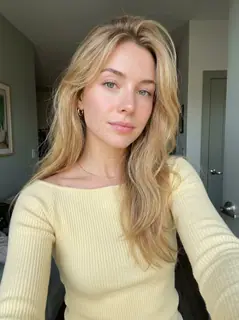
A man leans on a railing above a blue-lit dance floor. The view moves to the crowd under a spotlight and then to a blonde woman in a yellow top.
Generated example · 10 seconds · sound included. Made with the input photos shown.Imagine standing on a nightclub balcony, looking down at a crowded dance floor.
Then a spotlight lands on someone you know. They look up, you lock eyes, and suddenly it feels like a scene straight out of a romance movie.
That's the La Tormenta de Arena AI trend.
Now imagine recreating that moment with yourself and your partner, crush, or best friend.
No filming. No crowded nightclub. Just your photos and AI.
Here's how to make your own video, which photos work best, and what you should know before generating.
Quick Answer: How to Make the La Tormenta de Arena AI Video
The easiest way is to use the ready-made La Tormenta de Arena AI effect on TrendClipGen.
Choose the effect, upload two separate person photos, and hit Generate. Photo 1 controls the person at the upstairs railing; Photo 2 controls the person in the dance-floor spotlight. The AI creates the balcony shot and spotlight reveal using your photos as references.
What you'll need:
- Two clear photos — one person in each photo
- The La Tormenta de Arena AI effect
- Enough credits for your chosen quality
No need to recreate the scene yourself or write a complicated prompt. This version produces a 10-second, 9:16 video, with an estimated processing time of 5–15 minutes.
What Is the La Tormenta de Arena AI Trend?
The trend is built around one simple, cinematic moment.
Someone leans against a railing above a packed nightclub, looking down at the crowd. The camera moves toward the dance floor. A bright spotlight picks out one person, who slowly looks up toward the balcony.
The two people notice each other across the room.
It's dramatic, a little romantic, and perfect for imagining yourself in a movie.
The AI version lets creators replace the people in the scene using their own photos. Couples can create a romantic moment together. Friends can turn it into an inside joke. You can even make yourself the person who gets dramatically discovered in the crowd.
Where did the trend come from?
The trend takes its name from “La tormenta de arena” by Dorian, released in 2009 on La Ciudad Subterránea.
The song also features in the 2010 Spanish romance film Tres metros sobre el cielo (Three Steps Above Heaven, often shortened to 3MSC). Dorian's singer discusses that connection in this LOS40 interview.
The AI trend reimagines that romantic atmosphere through a balcony shot and dramatic spotlight reveal. You'll also see it called the “Te He Perdido Entre La Gente” trend, referring to a line meaning “I've lost you in the crowd.”
And despite the name, there's no actual sandstorm involved.
One Photo or Two: Who Appears in the Video?
This TrendClipGen effect requires two photos, with one person in each. A single photo or group selfie does not fill both upload slots.
Photo 1 — The person on the balcony
This is the person at the upstairs railing. You'll see them first from the front, then from behind as the camera looks toward the dance floor.
Photo 2 — The person in the spotlight
This is the person revealed downstairs, looking up toward the balcony, with a closer shot near the end.
Want to make it with your partner? Put yourself in the first role and your partner in the second — or reverse the upload order. These roles follow the scene, rather than fixed left and right positions.
How to Make Your Own La Tormenta de Arena AI Video
You don't need CapCut or video editing experience. Here's the simple way to get started.
Step 1 — Open the La Tormenta de Arena AI Effect
Open the La Tormenta de Arena AI effect on TrendClipGen.
Watch the preview before generating so you know which nightclub scene you're making. Check who appears upstairs and who gets the spotlight.
Step 2 — Upload Your Photos
Upload one clear photo per person, following the role labels: Photo 1 for the balcony, Photo 2 for the dance floor.
A head-and-shoulders or waist-up photo is a good starting point. Make sure both faces are clearly visible, and use photos you have permission to use.
You don't need to dress up or take photos in a nightclub. The AI creates the setting and uses your pictures to guide each person's appearance and clothing.
Step 3 — Generate and Download
Choose 480p, 720p, or 1080p, check the credit cost, then click Generate.
This effect creates a 10-second, 9:16 MP4 and includes the reference clip's audio track. The estimated processing time is 5–15 minutes. You can check progress in My videos.
Once it's ready, watch the balcony moment and spotlight reveal to see whether both people look recognizable. Happy with the result? Download it and share it with someone special.
Try La Tormenta de Arena AI →
Tips for a Better La Tormenta de Arena AI Video
A few small choices can make your result more convincing.
Use clear, well-lit photos. Your faces are the emotional focus of the scene. Avoid blurry images, sunglasses, heavily covered faces, and heavy beauty filters.
Upload one person per photo. Group pictures can make it harder to assign the right person to each role.
Pay attention to the photo order. Photo 1 is the balcony character; Photo 2 is the dance-floor character. Decide who should get the reveal before uploading.
Show the outfit you want to reference. A waist-up photo gives the AI more information about clothing than a tightly cropped face. Hidden details may still be invented.
Keep expectations realistic. AI can change facial details, hairstyles, or clothing during camera movements. An exact match throughout the video isn't guaranteed.
If the result doesn't look right, try a better reference photo before generating another version. A new successful generation uses additional credits.
Is La Tormenta de Arena AI Free?
You can browse and preview available effects for free, but generating your own video requires credits. Any complimentary credits available to your account appear in your balance.
Standard credit packs start at $9.90 for 100 credits. There's no monthly subscription or automatic renewal, and purchased credits don't expire.
For this 10-second effect, the current costs are 40 credits at 480p, 70 credits at 720p, or 170 credits at 1080p. Check the amount shown before generating.
See the TrendClipGen Pricing page for the current packs.
What if generation fails? If a task fails because of a technical error, its deducted credits are automatically returned. A completed video that doesn't look exactly how you imagined isn't considered a technical failure. Generating another version starts a new paid task.
Frequently Asked Questions
Can I make La Tormenta de Arena AI with one photo?
This effect needs two separate person photos. Photo 1 fills the balcony role; Photo 2 fills the spotlight role. There isn't a one-photo option with a preset second character in this template.
Can I make the video with my partner or crush?
Yes. Upload one clear photo of each person, and make sure they have agreed to be included in an AI-generated video. Choose the upload order based on who you want on the balcony and in the spotlight.
What song is used in La Tormenta de Arena AI?
The trend is associated with “La tormenta de arena” by Dorian. This template includes the audio from its reference clip; play the preview to hear the actual track. Generating a video does not grant separate music rights, and publishing platforms may apply their own audio rules.
Is La Tormenta de Arena AI from a movie?
The trend is associated with Tres metros sobre el cielo and its romantic nightclub atmosphere. Your AI video is a newly generated interpretation using your photos, rather than a clip of you inserted into the film itself.
Do I need a full-body photo?
Not necessarily. Clear waist-up portraits are a good starting point because faces, expressions, and upper-body appearance matter most here. A very tight face crop gives the AI less information about clothing.
Will my AI video look exactly like us?
Not always. AI uses your photos as references, but facial features and clothing may shift during generation. Sharp, well-lit images generally provide better starting references.
Ready to Make Your Own La Tormenta de Arena AI Video?
You don't need a movie set, a nightclub, or a camera crew.
Just choose your photos and let AI turn them into a cinematic moment across a crowded dance floor.
Make it romantic. Make it funny. Make it yours.
Make My La Tormenta de Arena AI Video →
Two photos. One spotlight. Your moment.