
How to Make the Transmission 5 Dance AI Video
Make your own Transmission 5 Dance AI video from a photo. Recreate the viral electro dance, learn which photos work best, and generate yours online.
Get two friends in step
Pick a left dancer and a right dancer for the Transmission 5 parking-lot routine, complete with fast arm swings and footwork.
- 2 photos
- 11s · 9:16 MP4
- 720p · 80 credits
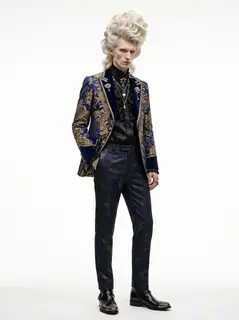
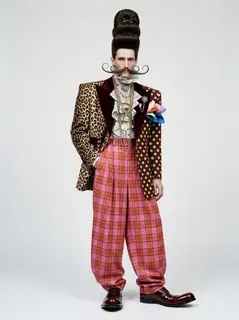
Two dancers in patterned jackets perform in a daytime parking lot. The blond dancer and his partner in red plaid trousers bend their knees and lean toward one another.
Generated example · 11 seconds · original audio. Made with the input photos shown.Two dancers. Perfectly synced moves. And not a single dance lesson.
You've probably seen the Transmission 5 Dance on Instagram or TikTok — two guys in a parking lot pulling off ridiculously fast arm movements, squats, and footwork like they've rehearsed for years.
Now imagine you and your best friend doing the same routine.
With AI, you can recreate the dance using photos. No choreography to learn, no filming, and no video editing required.
Here's how to make your own Transmission 5 Dance AI video, which photos work best, and what to know before generating.
Quick Answer: How to Make the Transmission 5 Dance AI Video
The easiest way is to use the Transmission 5 Dance AI effect on TrendClipGen.
On TrendClipGen, choose the effect, upload two separate person photos, and generate your video. Photo 1 controls the left dancer; Photo 2 controls the right dancer. The AI handles the choreography, movements, and parking lot scene.
What you'll need:
- Two clear photos — one person in each photo
- The Transmission 5 Dance AI effect
- Enough credits for your selected settings
You don't need to know how to dance. That's the whole point.
What Is the Transmission 5 Dance Trend?
The Transmission 5 Dance is a viral electro dance featuring two people performing fast, synchronized moves in a parking lot.
According to MakeViral’s trend guide, the routine comes from an October 13, 2026 Instagram collaboration by dancers @nikitaenc0re and @el_diablork.
What makes it so satisfying to watch?
Both dancers move almost perfectly together, throwing their arms across their bodies, dropping into deep squats, and switching between rapid footwork and sharp hand movements.
And they're doing all of this in an ordinary parking lot, with cars and people in the background.
AI versions of the trend let you replace the dancers with yourself or someone else, depending on the template.
It's a fun way to see yourself suddenly become an amazing dancer — or finally make that dance video with a friend who has absolutely no rhythm.
Can you make it with one photo or two?
This TrendClipGen effect requires two photos, one for each dancer. Photo 1 becomes the dancer on the left; Photo 2 becomes the dancer on the right. Upload separate single-person photos rather than one group selfie.
Other tools may offer a one-photo version, but this template has no solo toggle. Use two reference photos to fill both roles.
How to Make Your Own Transmission 5 Dance AI Video
You don't need CapCut or complicated AI prompts. Here's the easiest way to get started.
Step 1 — Open the Transmission 5 Dance Effect
Visit TrendClipGen and select the Transmission 5 Dance AI effect.
Watch the preview first so you know which choreography and video length to expect.
Different AI templates may recreate different sections of the dance.
Step 2 — Upload Two Person Photos
Choose a clear photo of yourself.
A full-body standing photo is ideal because this dance includes fast arm movements, squats, and footwork.
Upload a separate photo of your friend into Photo 2. Your photo goes in Photo 1 for the left dancer; theirs goes in Photo 2 for the right dancer. Use photos you have permission to use.
Make sure each person's face is clearly visible.
You don't have to pose like a dancer. A regular standing photo is enough to get started.
Step 3 — Generate and Download
Check the video settings and credit cost, then click Generate.
The AI creates an 11-second, 9:16 MP4 using your uploaded photos as references. This effect includes its original audio track. Allow approximately 5–15 minutes, and check progress in My videos.
When it's ready, watch the result. Check that your face looks recognizable and the movements feel natural.
Happy with it? Download your video and share it with friends or post it on TikTok or Instagram Reels.
Try Transmission 5 Dance AI →
Tips for a Better Transmission 5 Dance Video
The dance moves quickly, so your reference photos can make a real difference.
Use a standing photo. A full-body photo helps the AI understand your outfit and body proportions. A waist-up photo may work, but the model will have to invent more of your lower body.
Keep your face visible. Avoid blurry selfies, sunglasses, or heavy beauty filters. Clear facial details give the AI a better reference.
Use separate photos for two people. If you're making a duo video, choose one clear photo of each person rather than a group selfie.
Expect small differences. Fast hand movements and overlapping arms can be tricky for AI. Faces, fingers, and clothing may occasionally change during the dance.
Check before retrying. If the result doesn't look right, try a clearer photo. Remember that another successful generation may cost additional credits.
The goal is to create a fun, recognizable version of the dance, not a frame-perfect copy of the original.
Is the Transmission 5 Dance AI Free?
You can browse TrendClipGen's available video effects without a subscription, but generating videos requires credits.
Credit packs start at $9.90 for 100 credits.
There's no monthly subscription or automatic renewal, and purchased credits don't expire.
For this 11-second effect, the current costs are 40 credits at 480p, 80 credits at 720p, or 190 credits at 1080p. Check the displayed quote before generating.
You can see the current options on the TrendClipGen Pricing page.
What if your video fails?
If generation fails because of a technical error, TrendClipGen automatically returns the credits for that task.
If the video finishes successfully but you don't like the result, generating another version may require additional credits.
Frequently Asked Questions
Can I make the Transmission 5 Dance with just one photo?
This TrendClipGen effect needs two person photos. It replaces both dancers: Photo 1 is the left dancer and Photo 2 is the right dancer. A single uploaded photo does not fill both roles.
Do I need a full-body photo?
A full-body standing photo is recommended because the dance involves lots of body movement. A clear waist-up photo may also work, but it provides less information about your legs and outfit.
Can I make the dance with my friend?
Yes. Upload one clear photo of each person, and make sure your friend has agreed to be included. Put yourself on the left with Photo 1 and your friend on the right with Photo 2.
What song is used in the Transmission 5 Dance?
The trend is often associated with "Transmission 5" by Paranoid London, but the original Instagram reel is labeled with original audio. The exact recording hasn't been independently confirmed.
This TrendClipGen template includes its own original reference audio, aligned to the 11-second dance. Listen to the example to hear the actual sound. Generation does not include a separate music license; publishing platforms may apply their own audio rules.
How long is the Transmission 5 Dance AI video?
The TrendClipGen version is 11 seconds, in 9:16 portrait format, with 480p, 720p and 1080p options. The estimated processing time is 5–15 minutes. The example above shows the section of the routine this template recreates.
Will the AI video look exactly like me?
Not always. AI tries to preserve your appearance, but facial details and clothing can change during fast movements. A clear, well-lit reference photo usually gives the model a better starting point.
Ready to Try the Transmission 5 Dance?
You don't need dance lessons.
You don't need a parking lot.
And you definitely don't need to spend hours practicing synchronized moves with your best friend.
Just choose your photos, open the Transmission 5 Dance AI effect, and let AI handle the choreography.
Make My Transmission 5 Dance AI Video →
Two dancers. One routine. Your turn.