
Puerto Rican Mami Dance AI: Make Your Own Viral Dance
Turn your photos into the viral Puerto Rican Mami Dance AI video. Learn the moves, choose the best photos, and make your own version online.
Pick a partner for the side swap
Use two portraits to recreate the Puerto Rican Mami Dance, from the opening arm swings to the moment the dancers trade places.
- 2 photos
- 15s · 9:16 MP4
- 720p · 100 credits
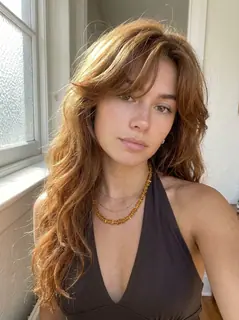
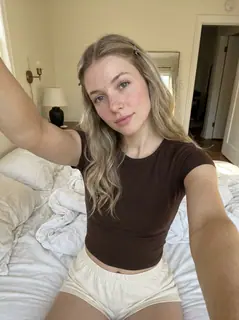
Two dancers move together beneath an outdoor roof at night. They raise their arms side by side, turn toward each other and finish facing forward.
Generated example · 15 seconds · sound included. Made with the input photos shown.Every friend group has that one person who sends a TikTok at midnight and says, "We should learn this."
Well, here's your chance to skip the practice.
The Puerto Rican Mami Dance is the TikTok routine where two friends throw their arms wide, bounce to the beat, slap their knees, and switch places like they've been rehearsing all week.
It's playful, a little chaotic, and even better when it's you and your best friend doing it.
With AI, you can make your own version from photos. You don't have to learn the choreography or convince someone to film you.
Want to try it? Head to TrendClipGen and find the Puerto Rican Mami Dance effect. Pick your photos, check the preview, and let AI handle the moves.
The Dance That's All Over TikTok
If you haven't seen it yet, here's what you're missing.
Two friends stand side by side under a covered walkway at night. The camera sits low, almost at ground level.
They start bouncing, throw their arms up, slap a knee, and move around each other to switch sides. Then they lean toward the camera to finish.
It's not the kind of routine that needs professional dancers. The fun comes from the timing, the personality, and the way both people play off each other.
Trend guides trace the spoken audio to the sitcom Everybody Hates Chris and credit Baby On The Track with the beat. They credit @_kenyaad and @brebre with the duo routine.
Compare the linked dance post and sound post if you're looking for the choreography or audio.
AI versions give people a way to join in without recording the choreography themselves.
And despite the name, this isn't a traditional Puerto Rican dance. "Puerto Rican Mami" comes from the audio that accompanies the trend.
The Best Part? Making It With Someone You Know
Sure, watching two strangers dance is entertaining.
But imagine seeing yourself and your roommate absolutely nailing the routine. Or making a version with your partner, your sibling, or the friend who insists they can't dance.
That's where the AI version gets fun.
This TrendClipGen effect requires two separate person photos. There isn't a solo option in this template.
Photo 1 controls the dancer who starts on the left, slightly farther back. Photo 2 controls the dancer who starts on the right, closer to the camera.
Around 9–10 seconds, the pair crosses over: Photo 1 moves to the right front, while Photo 2 moves to the left rear. Each photo stays attached to its own dancer's movement throughout the routine.
The generated example above shows both starting positions and the crossover. Choose who should follow each path before uploading.
Your Photos Matter More Than Your Dance Skills
Here's something worth knowing before you generate: this effect involves a lot of movement.
The dancers raise their arms, lift their knees, and change positions. A tightly cropped selfie doesn't give the AI much information about the rest of your body.
For a better starting point:
- Choose a full-body or knees-up photo. Give the AI a clear view of your arms, legs, and outfit.
- Face the camera. A sharp, front-facing photo usually provides a stronger identity reference.
- Leave some space around your body. The dance includes wide arm movements.
- Use one person per photo. For a duo, separate photos are easier to assign to individual dancers.
You don't need matching outfits or a special background.
And if you're making it with a friend, pick photos where you both look recognizable. The whole joke is seeing two familiar people suddenly become a perfectly coordinated dance duo.
Let's Make Your Puerto Rican Mami Dance Video
You can try to recreate the dance manually in a video editor. But if your goal is simply to put yourself in the trend, a ready-made AI effect is much easier.
Find the Dance on TrendClipGen
Visit TrendClipGen and open the Puerto Rican Mami Dance effect.
Start by watching the sample. You'll want to see the arm movements, knee slap, and side-switching moment before choosing your photos.
Add Your Photos
Upload two photos, with one person in each. Use Photo 1 for the dancer who starts left-back and Photo 2 for the dancer who starts right-front. A group selfie isn't automatically split between the two upload slots. Use photos of consenting adults.
There's no need to record yourself dancing. The effect provides the movement.
Generate, Watch, and Download
Review the video settings and credit cost, then click Generate.
This effect produces a 15-second, 9:16 MP4, with 480p, 720p, and 1080p options. The estimated processing time is 5–15 minutes. Check progress in My videos.
When your video is ready, watch the entire routine. Check whether the faces remain recognizable, especially when the two dancers cross paths.
If you like the result, download it and send it to the person you made it with.
Try the Puerto Rican Mami Dance Effect →
One Thing to Watch For: The Side Swap
This dance has a moment that can be tricky for AI.
Around 9–10 seconds into this 15-second version, the dancers switch places. Photo 1 moves to the right front; Photo 2 moves to the left rear.
Sometimes AI video generation struggles to keep two identities separate during crossing movements. One person's face may briefly resemble the other's, or clothing details may change.
That's not something you can always prevent, but clearer photos give the model better references.
If you're making a duo, try using photos with noticeably different outfits. It may help make the two characters easier to distinguish.
And remember, a successful generation isn't guaranteed to match the original TikTok perfectly. You're creating your own AI version, not simply pasting two faces over an existing video.
What About the Original Sound?
The beat is credited to Baby On The Track in the linked TikTok references. Play the preview to hear the actual audio used by this effect.
This template includes the reference clip's full 15-second soundtrack. The dance is generated first, then the audio is added. It doesn't re-sing the words or clone either person's real voice, and this preset has no custom music selector.
If you want another track, use music you're authorized to include when editing or posting. Generating the video does not grant a separate music license.
Is Puerto Rican Mami Dance AI Free?
Browsing the available effects on TrendClipGen is free, but generating videos requires credits.
Standard credit packs start at $9.90 for 100 credits, purchased once. There's no subscription or automatic renewal, and your purchased credits don't expire.
For this 15-second effect, the current costs are 50 credits at 480p, 100 credits at 720p, or 250 credits at 1080p. Check the displayed cost before generating; a 100-credit pack doesn't cover the 1080p option. Any complimentary credits available to your account appear in your balance.
If a generation fails due to a technical error, the credits used for that task are automatically returned.
You can find the details on the TrendClipGen Pricing page.
A Few Questions Before You Hit Generate
Can I make the Puerto Rican Mami Dance with just one photo?
This TrendClipGen template requires two separate person photos, one for each dancer. It has no solo toggle or preset second character. Photo 1 starts left-back and Photo 2 starts right-front.
Will the AI keep my clothes and hairstyle?
It uses your photos as visual references, but the results depend on the effect. Clothing, hair, and facial details can change during fast movements, so perfect consistency isn't guaranteed.
Can I use a photo of my best friend?
Yes, if your friend has given permission. TrendClipGen is intended for adults, so use photos of consenting adults. Upload one person in each photo and choose the starting positions together.
Can I post my AI dance on TikTok or Instagram?
You can share your generated video, subject to the platform's rules. Check whether an AI-generated-content label is required and use music you're authorized to include.
What if my generated dance looks weird?
Fast movements and overlapping arms can cause visual mistakes. Try a sharper, better-framed photo before making another version. Keep in mind that a successfully completed retry can use additional credits.
Your Group Chat Isn't Ready for This
Some trends are fun to watch. This one's better when you're in it.
Pick a photo of yourself and one of a consenting friend. Then see what happens when AI gives you both a set of dance moves you've never practiced.
You might end up with the funniest video in your camera roll.
Make My Puerto Rican Mami Dance AI Video →