
How to Make a Smooth Criminal Remix Dance AI Video
Make your own Smooth Criminal Remix Dance AI video with a friend. Learn which photos work best, recreate the viral duet, and generate yours online.
Cast a friend or a pet in the living-room duet
Put two separate photos into the Smooth Criminal remix. Both dancers follow the same face covers, side points and turns.
- 2 photos
- 15s · 9:16 MP4
- 720p · 100 credits
A white dog and a man in a brown jacket dance side by side in a living room. They crouch and raise their paws and hands in matching gestures.
Example video · 15 seconds · sound included. The two input photos appear later in this guide.The funniest part of the Smooth Criminal remix dance isn't even the dancing.
It's how seriously everyone takes it.
Two people stare straight into the camera like they're about to deliver some important news. Then the beat kicks in, they're ducking, throwing their arms around, and committing to a routine that gets funnier with every move.
Now picture yourself doing that with your best friend. Or your partner. Or the one friend who swears they have absolutely no rhythm.
That's the appeal of Smooth Criminal Remix Dance AI. You can turn ordinary photos into a dance video without getting together to film it.
On TrendClipGen, the Smooth Criminal Remix Dance AI effect uses two separate photos to make a 15-second, 9:16 dance video in a warm apartment living room, with the supplied reference clip's original soundtrack. Both slots accept people or animals, so your dog can be your dance partner, too.
The Smooth Criminal Dance You Keep Seeing on TikTok
This isn't Michael Jackson's famous gravity-defying lean. The remix trend is a playful duet built around exaggerated reactions, a synchronized duck-and-cover, and sharp arm movements timed to the beat.
A popular rooftop version features Cadel and Mia (@cadelandmia). The linked creator clip and Starrd's dance guide provide more background on that version.
Other versions put a different spin on the same idea. The effect on TrendClipGen follows the supplied dog-and-person living-room reference: stepping into the beat, covering both faces, pointing sideways, raising fists beside the face, a hand-over-head gesture, and an open-arm finish.
The camera stays in front of the pair. You get the playful duet format, rather than a rooftop recreation or the classic fedora-and-lean routine.
Watch the preview first so you know which version you're making.
Pick the Friend Who Would Make This Even Funnier
You don't need a professional dance partner. In fact, that might defeat the purpose.
Imagine your friend who never smiles in photos suddenly committing to the face-covering move. Or you and your roommate performing the routine in your everyday outfits.
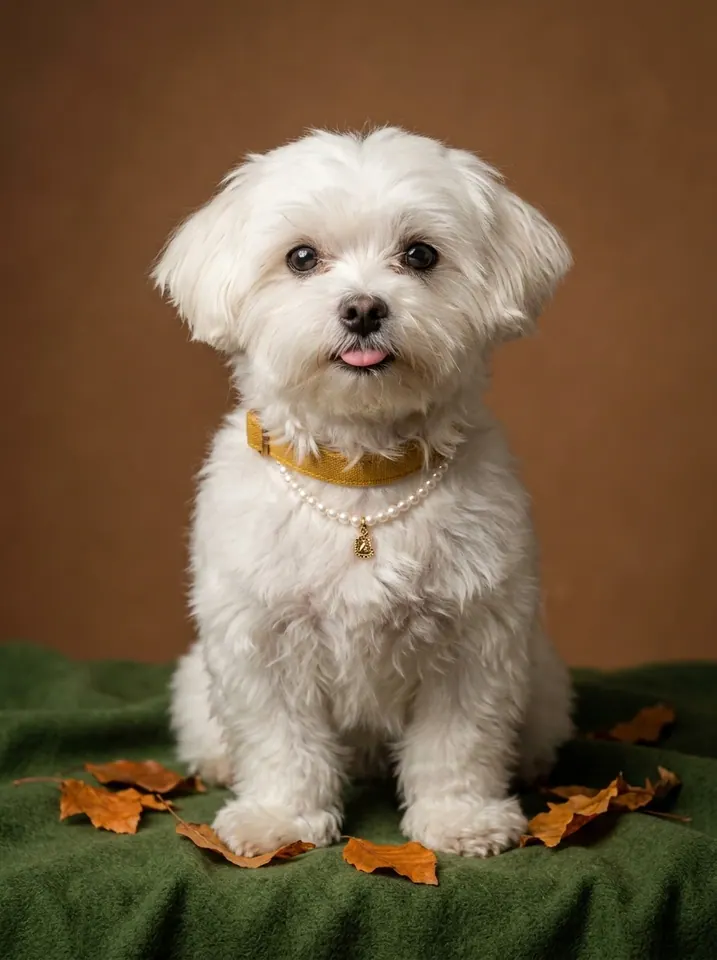
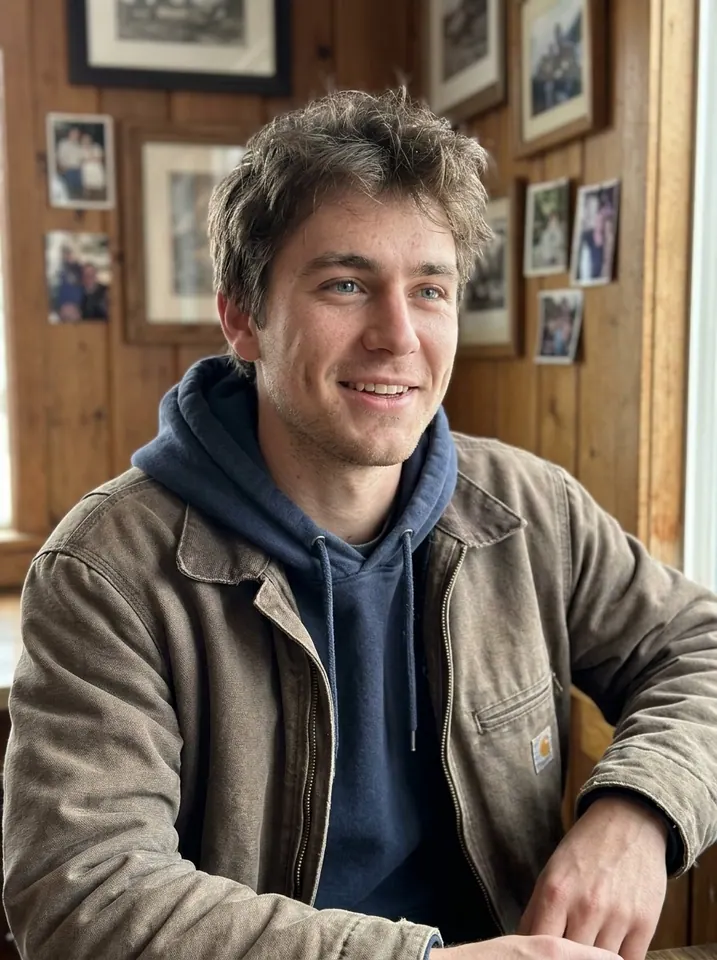
For this effect, Photo 1 controls the dancer on the left, and Photo 2 controls the dancer on the right. Each slot accepts one person or one animal. You can make a human duet, a person-and-pet pair, or two dancing pets.
The original left dancer happens to be a dog. Uploading a person in Photo 1 asks the AI to replace that role with your person; it doesn't mean your photo should turn into the original dog.
Example inputs: the supplied case video above uses these two photos. Photo 1 guides the left dancer; Photo 2 guides the right dancer.
How to Make Your Own Smooth Criminal Remix Dance AI Video
You could learn the choreography, find somewhere to film, and convince your friend to rehearse with you. Or you could try a ready-made AI dance effect.
Here's the simpler route with TrendClipGen.
First, Find the Right Dance
Open the Smooth Criminal Remix Dance AI effect and watch the example. Look for the moves you want to recreate: the synchronized duck, sideways point, face-side fists, and open-arm finish.
This preset uses a fixed living-room scene. The background in your uploaded photo doesn't select a new filming location.
Next, Choose Your Two Stars
Upload one clear photo per slot: your left dancer in Photo 1 and your right dancer in Photo 2. A group selfie doesn't fill both positions.
A full-body photo gives the AI more information about clothing and proportions. A clear waist-up portrait can also be a starting point, although the model will need to fill in more details. For pets, keep the head, ears, muzzle, and coat markings visible.
Finally, Generate Your Video
Choose 480p, 720p or 1080p, review the displayed credit cost, then click Generate. Estimated processing time is 5–15 minutes. Check progress in My Videos, where you can preview and download the finished MP4.
Watch the whole routine, especially the moment after the dancers uncover their faces. Do both subjects still look recognizable? Do the outfits or coat markings stay distinct?
If you're happy with the result, send it to your dance partner.
Try Smooth Criminal Remix Dance AI →
A Small Photo Tip That Makes a Big Difference
Two-subject AI dances are trickier than they look. The dancers move together, cover their faces, and bring their arms close to each other. During those moments, AI can mix up facial features, hairstyles, clothes, or fur.
Give it a better starting point with a few simple choices:
- Use one subject per photo. Avoid crowded group selfies or several pets in the same image.
- Keep faces clearly visible. Good lighting and minimal filters help. Avoid sunglasses, covered eyes, and a phone blocking the face.
- Show the outfit or coat. Full-body photos provide more information for the stepping and arm movements. For pets, include distinctive markings where possible.
- Choose distinct looks. Different hairstyles, outfits, or coat patterns help separate the two references.
You don't need to copy the original dancers' wardrobe. Each photo guides its subject's appearance and visible clothes. But that guidance isn't a guarantee: fast motion and face-covering can still change details.
Check your reference photos before spending credits on another attempt. A longer prompt alone won't guarantee a better likeness.
Is Smooth Criminal Remix Dance AI Free?
Browsing effects and watching the preview are free. Generating your own version uses credits. This 15-second effect costs 50 credits at 480p, 100 at 720p, or 250 at 1080p. Review the selected quality and displayed cost before submitting.
The regular USD Starter Pack is $9.90 for 100 credits. Eligible first-purchase offers and regional prices appear on Pricing & Credits. One-time credit packs have no automatic renewal, and purchased pack credits don't expire. Membership options have their own billing and credit rules.
If generation fails because of a technical issue, the credits deducted for that task are automatically returned. If a video generates successfully but you want a different result, another generation starts a new paid task. See the Refund Policy for details.
What About the Smooth Criminal Music?
The trend uses a remix of Michael Jackson's “Smooth Criminal.” Different edits can use different excerpts, so play the preview to hear the sound for this version.
This effect adds the supplied reference clip's original 15-second soundtrack to the generated picture. You don't need to upload a voice recording or add music separately. It doesn't clone your real voice, offer a custom song selector, or guarantee exact lip-sync.
When sharing, use music you're authorized to publish and follow the destination platform's rules. Creating an AI video doesn't itself provide permission to use a recording in an advertisement.
Questions People Have Before Making the Dance
Can I make this Smooth Criminal Remix AI video with one photo?
This effect requires two separate photo uploads, one for each dancer. To replace both roles with you and a friend, upload one individual photo of each person.
Is this Michael Jackson's original Smooth Criminal dance?
No. This preset follows the playful remix duet shown in the preview. It doesn't recreate the classic music-video routine, anti-gravity lean, or moonwalk.
Do I need full-body photos?
They're recommended because the routine includes arm movements, bends, and stepping. Clear waist-up photos may work, but the AI has less information about the rest of the body and outfit.
Can I keep my original clothes and background?
Your photos guide each subject's appearance and visible clothing, although details can change during generation. This preset uses the living-room setting shown in the preview; it doesn't preserve or select the background from your photos.
Can I make the dance with my dog or cat?
Yes. Both upload slots accept people or animals. You can pair yourself with a pet or use two pets. Choose separate, sharp photos with clear heads, ears, muzzles, and visible fur markings. Animal motion can still produce imperfect paws or body details.
Can I post my AI dance on TikTok or Instagram?
Follow the platform's current rules, use music you have permission to include, and apply AI-content labels when required. Get permission from anyone whose photo you use. Read our Privacy Policy for information about photo processing.
This Might Be Your Best Group Chat Video Yet
The original dancers make the routine look effortless. Your version doesn't have to.
Maybe you'll look surprisingly good. Maybe your friend will steal the show. Or maybe your dog will turn out to be the strongest dancer in the house.
Pick your photos, try the effect, and let your friends decide who nailed the choreography.
Make Our Smooth Criminal Remix Dance Video →
And if your friend asks when you learned to dance like that? You can decide how much of the truth to tell them.